Looping Statements in Java: for, while, and do-while
Looping Statements
Looping statements enable repetitive execution of code blocks based on a condition. They eliminate redundancy, reduce code length, and make programs scalable and maintainable. Any program that processes collections, performs repeated calculations, validates input, or iterates over data relies heavily on loops.
Java provides three primary looping constructs:
forloopwhileloopdo-whileloop
Each loop differs in structure, execution flow, and use case, and selecting the correct loop is a design decision rather than a syntactic choice.
Purpose of Looping Statements
Looping statements are used to:
- Execute code multiple times
- Traverse arrays and collections
- Process records from databases or files
- Perform calculations iteratively
- Control repeated workflows
Without loops, programs would require duplicated code, leading to poor readability and high maintenance cost.
🔁 for Loop in Java
What Is the for Loop Really Used For?
The for loop is a count-controlled loop.
That means it is used when:
- The number of repetitions is known in advance
- Or can be calculated before starting the loop
This makes for loop the most predictable loop in Java.
🔹 Definition
The for loop repeatedly executes a block of code as long as a given condition remains true.
It combines initialization, condition checking, and update logic in a single, compact structure.
🔹 Syntax
for (initialization; condition; update) {
    // statements
}
Each part has a specific role, and together they control how many times the loop runs.
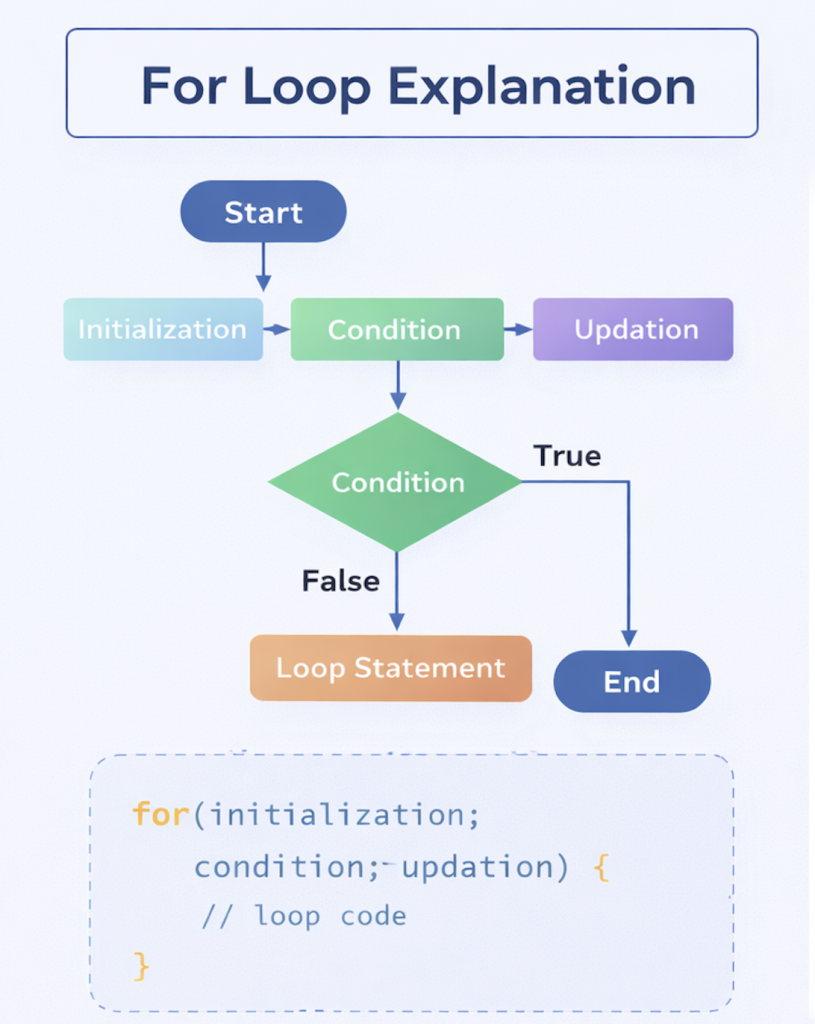
🔹 Execution Order (Very Important)
The for loop follows a strict execution sequence:
- Initialization → runs once
- Condition check
- Loop body executes (if condition is true)
- Update executes
- Condition is checked again
- Steps 3–5 repeat until condition becomes false
Once the condition is false, the loop terminates immediately.
🔹 Basic Example
for (int i = 1; i <= 5; i++) {
    System.out.println(i);
}
Output
1
2
3
4
5
🔹 Step-by-Step Execution (How Java Thinks)
- Initialization:
int i = 1 - Condition:
i <= 5→ true → print1 - Update:
i++→i = 2 - Condition:
2 <= 5→ true → print2 - …
- When
i = 6→ condition fails → loop exits
This predictability is why for loops are so widely used.
🔹 Explanation of Each Component
1️⃣ Initialization
int i = 1;
- Declares and initializes the loop control variable
- Executes only once
- Variable scope is limited to the loop
Example:
for (int i = 0; i < 10; i++) { }
Outside the loop, i is not accessible.
2️⃣ Condition
i <= 5
- A boolean expression
- Decides whether the loop should continue
- Checked before every iteration
If the condition is false initially, the loop body never executes.
3️⃣ Update
i++
- Modifies the loop variable after each iteration
- Controls progress toward loop termination
- Can increment, decrement, or modify multiple variables
Examples:
i++
i--
i += 2
🔹 Important Rule About Components
All three parts are optional, but omitting them must be intentional and logical.
Example: No Initialization
int i = 1;
for (; i <= 5; i++) {
    System.out.println(i);
}
Example: No Update
for (int i = 1; i <= 5;) {
    i++;
}
Example: No Condition (Infinite Loop)
for (;;) {
    // runs forever
}
🔹 Common Variations of for Loop
🔸 Multiple Variables
for (int i = 1, j = 5; i <= j; i++, j--) {
    System.out.println(i + " " + j);
}
Why This Works
- Multiple variables initialized together
- Multiple updates allowed
- Useful in two-pointer logic
Output:
1 5
2 4
3 3
🔸 Infinite for Loop
for (;;) {
    // runs forever
}
When Used
- Server programs
- Event listeners
- Background services
- Continuous monitoring systems
⚠️ Must include a break condition inside to avoid freezing the program.
🔹 Why for Loop Is Preferred in Many Cases
Strengths
- Compact and readable
- Predictable execution
- Perfect for index-based logic
- Easy to debug
Weakness
- Not ideal when termination condition is unknown (better use
while)
🔹 Appropriate Usage of for Loop
Use for loop when:
✔ Iterating a fixed number of times
✔ Traversing arrays or lists with known size
✔ Performing index-based operations
✔ Mathematical sequences
✔ Repetitive tasks with clear limits
🔹 Real-Life Examples
| Scenario | Why for |
|---|---|
| Print first 10 numbers | Known count |
| Traverse array | Size known |
| Calculate factorial | Fixed iterations |
| Menu options loop | Controlled execution |
🔚 Final Summary
forloop = control + clarity- Best when iteration count is known
- Most used loop in Java
- Clean, predictable, and powerful
A good Java developer:
- Uses
forwhen count is known - Avoids abusing
forfor unknown conditions - Keeps loops readable and intentional
🔁 while Loop in Java
What Problem Does the while Loop Solve?
Not every loop has a fixed number of iterations.
Many real programs repeat an action until something changes at runtime:
- User enters valid input
- Data keeps coming from a file
- A condition becomes false dynamically
This is exactly where the while loop is used.
🔹 Definition
The while loop is a condition-controlled loop.
It executes a block of code only while the given condition remains true.
If the condition is false initially, the loop never runs.
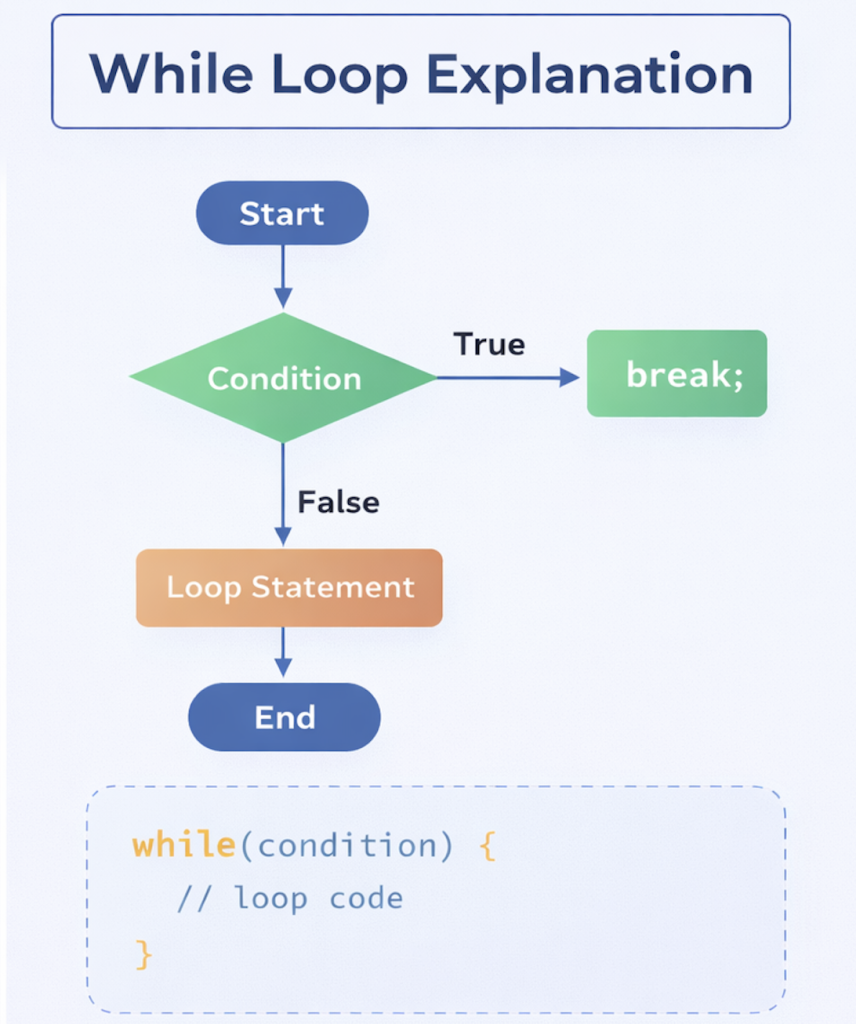
🔹 Syntax
while (condition) {
    // statements
}
Important Rule
- The condition must be a boolean expression
- Condition is checked before executing the loop body
🔹 Basic Example
int count = 1;

while (count <= 5) {
    System.out.println(count);
    count++;
}
Output
1
2
3
4
5
🔹 Execution Flow (Step-by-Step)
- Java evaluates the condition
count <= 5 - If
true→ loop body executes - Update occurs inside the loop
- Condition is checked again
- Steps repeat until condition becomes
false - Loop exits immediately when condition fails
🔹 Critical Behavior to Understand
Loop May Not Execute at All
int count = 10;

while (count <= 5) {
    System.out.println(count);
}
Here:
- Condition is false initially
- Loop body is skipped entirely
This behavior is intentional and important.
🔹 Appropriate Usage of while Loop
Use while when:
✔ Number of iterations is not known in advance
✔ Loop depends on runtime input
✔ Termination condition is dynamic
✔ You must check condition before executing logic
Real-World Examples
- Input validation
- Reading data until EOF
- Server polling
- Game loops
- Retry mechanisms
🔹 Common Mistake (Infinite Loop)
while (true) {
    System.out.println("Hello");
}
This loop never ends because:
- Condition never becomes false
- No update or break exists
Always ensure:
- Condition changes
- Or a
breakstatement exists
🔁 do-while Loop in Java
Why do-while Exists
Sometimes, the first execution is mandatory, regardless of condition.
Example:
- Display menu at least once
- Ask user for confirmation
- Show options before validation
The while loop cannot guarantee this.
The do-while loop can.
🔹 Definition
The do-while loop executes the loop body at least once, then checks the condition.
Even if the condition is false initially, one execution always happens.
🔹 Syntax
do {
    // statements
} while (condition);
⚠️ Semicolon is mandatory at the end.
🔹 Example
int number = 1;

do {
    System.out.println(number);
    number++;
} while (number <= 5);
Output
1
2
3
4
5
🔹 Execution Flow (Key Difference)
- Loop body executes first
- Condition is evaluated
- If condition is true → repeat
- If condition is false → exit
🔹 Proof of Guaranteed Execution
int number = 10;

do {
    System.out.println("Executed");
} while (number <= 5);
Output
Executed
Even though the condition is false, the loop runs once.
🔹 Appropriate Usage of do-while Loop
Use do-while when:
✔ At least one execution is mandatory
✔ User interaction is required
✔ Menu-driven programs
✔ Confirmation prompts
Common Real-Life Scenarios
- ATM menu
- Game start screen
- Continue / Exit prompts
- Password retry prompts
🔚 Final Summary
while→ condition first, execution laterdo-while→ execution first, condition later- Choose based on control requirement
- Misusing loops leads to bugs, not features
A good Java developer:
- Knows why a loop exists
- Chooses the right loop for the problem
- Avoids infinite loops unintentionally
Comparison of for, while, and do-while
| Feature | for | while | do-while |
|---|---|---|---|
| Condition Check | Before iteration | Before iteration | After iteration |
| Guaranteed Execution | No | No | Yes |
| Best Use Case | Fixed iterations | Conditional looping | Mandatory execution |
| Readability | High for counters | High for conditions | Clear intent for single-run |
| Minimum runs | 0 | 0 | 1 |
🔁 Loop Control Statements in Java
Loops repeat code, but real programs need control:
- When to stop the loop
- When to skip unnecessary iterations
- How to handle complex repeated structures
Java provides loop control statements to manage this flow precisely.
The most important ones are:
breakcontinue- Nested loops (structure-based control)
🔹 break Statement
Definition
The break statement immediately terminates the loop in which it is placed.
Control jumps outside the loop, regardless of the remaining iterations.
Example
for (int i = 1; i <= 10; i++) {
    if (i == 5) {
        break;
    }
    System.out.println(i);
}
Output
1
2
3
4
Execution Explanation (Step-by-Step)
- Loop starts from
i = 1 - Values
1to4are printed - When
i == 5:breakexecutes- Loop stops immediately
- Remaining iterations (
6–10) never run
Important Characteristics of break
- Stops the entire loop, not just the current iteration
- Works with:
forwhiledo-whileswitch
- Control exits one level only (unless labeled)
Real-Life Use Cases
- Exit when target is found
- Stop reading input on a sentinel value
- Abort processing on error
- Exit infinite loops safely
🔹 continue Statement
Definition
The continue statement skips the current iteration and moves control to the next iteration of the loop.
The loop itself does not terminate.
Example
for (int i = 1; i <= 5; i++) {
    if (i == 3) {
        continue;
    }
    System.out.println(i);
}
Output
1
2
4
5
Execution Explanation
i = 1→ printedi = 2→ printedi = 3→continueexecutes- Print statement is skipped
i = 4and5→ printed
Key Difference from break
| Statement | Effect |
|---|---|
break | Ends the loop completely |
continue | Skips current iteration only |
Common Use Cases for continue
- Skip invalid input
- Ignore unwanted values
- Filter data during iteration
- Avoid deep
ifnesting
🔹 Nested Loops
Definition
A nested loop is a loop placed inside another loop.
- Outer loop controls rows / major cycles
- Inner loop controls columns / repeated sub-tasks
Example
for (int i = 1; i <= 3; i++) {
    for (int j = 1; j <= 3; j++) {
        System.out.print("* ");
    }
    System.out.println();
}
Output
* * *
* * *
* * *
Execution Breakdown
- Outer loop runs 3 times
- Inner loop runs 3 times for each outer iteration
- Total inner executions =
3 × 3 = 9
This creates a grid-like structure.
How Nested Loops Actually Work
Outer Loop (i) | Inner Loop (j) | Output |
|---|---|---|
| 1 | 1 → 3 | * * * |
| 2 | 1 → 3 | * * * |
| 3 | 1 → 3 | * * * |
🔹 Common Uses of Nested Loops
Nested loops are unavoidable in many real scenarios:
✔ Matrix processing
✔ Pattern printing
✔ Multidimensional arrays
✔ Table generation
✔ Game boards
✔ Data comparison
🔹 Important Performance Insight
- Time complexity increases multiplicatively
- Nested loops can become expensive quickly
- Depth should be minimized where possible
Example:
- One loop →
O(n) - Two nested loops →
O(n²)
🔹 break and continue Inside Nested Loops
breakexits only the inner loop- Outer loop continues unless explicitly stopped
for (int i = 1; i <= 3; i++) {
    for (int j = 1; j <= 3; j++) {
        if (j == 2) {
            break;
        }
        System.out.print(j + " ");
    }
    System.out.println();
}
Output:
1
1
1
🔚 Final Summary
break→ exit loop completelycontinue→ skip current iteration- Nested loops → powerful but expensive
- Poor loop control = bugs + performance issues
A good Java developer:
- Uses
breakdeliberately - Uses
continuesparingly - Keeps nesting shallow
- Always thinks about execution cost
Common Looping Errors
- Infinite loops due to missing update
- Off-by-one errors (
<vs<=) - Modifying loop variable incorrectly
- Using wrong loop type
- Deeply nested loops reducing readability
Such errors can cause performance issues or application hangs.
Loop Selection Guidelines
- Use
forwhen iteration count is predictable - Use
whilewhen continuation depends on condition - Use
do-whilewhen execution must occur at least once - Keep loop bodies small and readable
- Avoid unnecessary nesting
Proper loop selection improves performance and maintainability.
Looping Statements in Large Applications
In production systems:
- Loops process large datasets
- Efficiency impacts response time
- Incorrect loops cause performance bottlenecks
- Readable loops reduce debugging effort
Loop design directly affects application stability and scalability.
Conclusion
Looping statements are essential for controlling repeated execution in Java programs. The for, while, and do-while loops each offer distinct execution models suited to different scenarios. Understanding their structure, behavior, and appropriate usage enables developers to write efficient, readable, and maintainable code. Mastery of looping constructs is fundamental for handling real programming problems and building scalable Java applications.