Java Conditional Statements: if, if-else, and switch
Java Conditional Statements
Conditional statements form the decision-making backbone of Java programs. They allow a program to execute different blocks of code based on conditions evaluated at runtime. Without conditional statements, programs would execute sequentially without intelligence, making them unsuitable for practical problem-solving.
Java provides structured and well-defined conditional constructs that ensure clarity, predictability, and maintainability in program logic. The primary conditional statements are:
ifif-elseelse-ifladderswitch
Each serves a specific purpose and must be chosen carefully based on the problem being solved.
Purpose of Conditional Statements
Conditional statements enable a program to:
- Compare values
- Make decisions
- Control execution flow
- Handle multiple scenarios
- Implement business rules
Decision logic in applications such as authentication systems, payment processing, grading systems, and workflow engines depends entirely on conditional statements.
Below is a much deeper, cleaner, and professional explanation of Java conditional statements, written the way a strong core-Java tutorial should explain it.
Everything is expanded with logic, flow, real meaning, and practical reasoning — not just definitions.
🔹 if Statement
Definition
The if statement executes a block of code only when a condition evaluates to true.
If the condition is false, the block is completely ignored.
There is no fallback or alternative execution.
Syntax
if (condition) {
    // statements
}
Important Rule
- The condition must return a boolean value (
trueorfalse) - Numeric values (like C/C++) are not allowed in Java
❌ Invalid:
if (5) { }
✅ Valid:
if (5 > 3) { }
Example
int marks = 75;

if (marks >= 35) {
    System.out.println("Pass");
}
Execution Flow (Step-by-Step)
- Java evaluates the condition:
marks >= 35 - If the condition is true:
- Code inside
{ }executes
- Code inside
- If the condition is false:
- Java skips the block
- Program continues normally
There is no else, so nothing happens if the condition fails.
Key Characteristics of if
- Executes only one block
- No alternative execution path
- Best for simple validation
- Keeps code clean and readable
- Avoids unnecessary branching
When to Use if
Use if when:
- Only one action is required
- No failure handling is needed
- You just want to check a condition and act
Examples:
- Check pass/fail
- Check eligibility
- Check minimum balance
- Validate input range
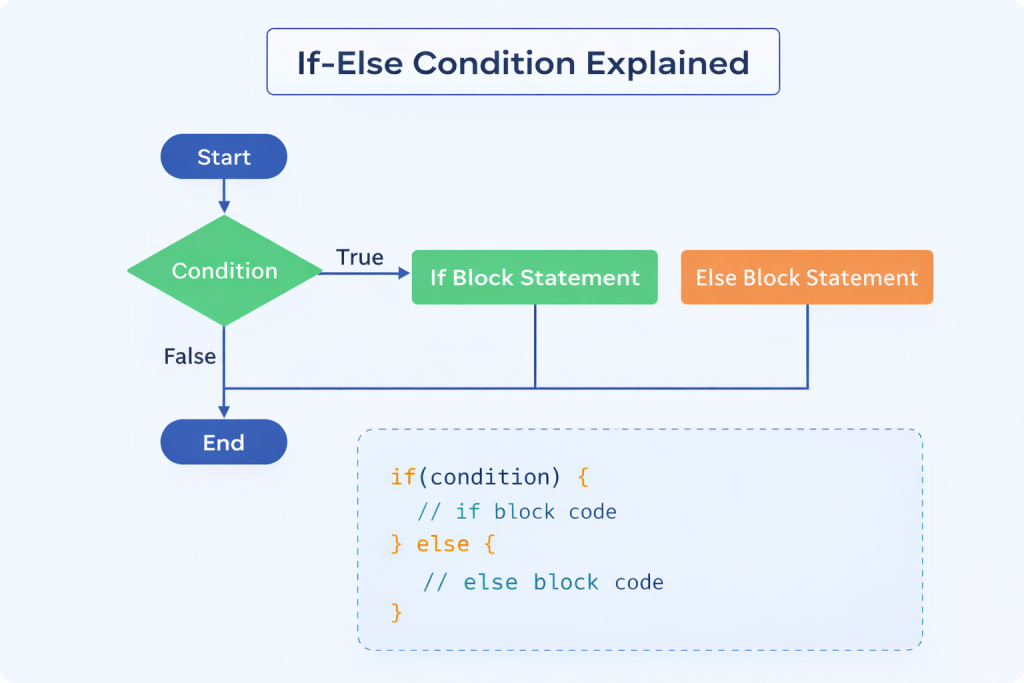
🔹 if-else Statement
Definition
The if-else statement provides two guaranteed execution paths:
- One when the condition is
true - One when the condition is
false
Exactly one block will execute — no ambiguity.
Syntax
if (condition) {
    // true block
} else {
    // false block
}
Example
int age = 16;

if (age >= 18) {
    System.out.println("Eligible for voting");
} else {
    System.out.println("Not eligible for voting");
}
Execution Behavior
- Condition is evaluated
- If
true→ifblock executes - If
false→elseblock executes - Both blocks can never execute together
This ensures guaranteed output for every input.
When to Use if-else
Use if-else when:
- Decision has two opposite outcomes
- One action must always happen
- Failure handling is mandatory
Examples:
- Login success / failure
- Payment approved / declined
- Eligible / not eligible
🔹 else-if Ladder
Definition
The else-if ladder allows checking multiple conditions one by one.
The first condition that evaluates to true executes, and the rest are skipped.
Syntax
if (condition1) {
    // block 1
} else if (condition2) {
    // block 2
} else if (condition3) {
    // block 3
} else {
    // default block
}
Example
int score = 82;

if (score >= 90) {
    System.out.println("Grade A");
} else if (score >= 75) {
    System.out.println("Grade B");
} else if (score >= 60) {
    System.out.println("Grade C");
} else {
    System.out.println("Fail");
}
Execution Flow
- Conditions are checked top to bottom
- Once a condition becomes
true:- Its block executes
- Remaining conditions are ignored
- If no condition matches:
elseblock executes
Important Observations
- Order matters
- Incorrect ordering leads to logical bugs
❌ Wrong Order:
if (score >= 60) {
    System.out.println("Grade C");
} else if (score >= 90) {
    System.out.println("Grade A");
}
This makes higher grades unreachable.
Performance Consideration
- Time complexity increases linearly
- Each condition is checked one by one
- For many conditions:
- Code becomes harder to read
- Maintenance becomes difficult
👉 In such cases, switch is often better.
🔹 Nested if Statements
Definition
A nested if means placing one if statement inside another if block.
This is used when one condition depends on another.
Example
int age = 20;
boolean hasId = true;

if (age >= 18) {
    if (hasId) {
        System.out.println("Access granted");
    }
}
Execution Explanation
- Outer condition (
age >= 18) is checked - Only if it is
true, inner condition is evaluated - Both must be
truefor execution
Usage Guidelines
✅ Use nested if when:
- Conditions are dependent
- Second check makes sense only after first
❌ Avoid when:
- Nesting becomes deep
- Readability suffers
- Logic becomes hard to trace
Better Alternative (When Possible)
if (age >= 18 && hasId) {
    System.out.println("Access granted");
}
This is cleaner and easier to maintain.
🔚 Final Summary (Straight Truth)
| Statement | Best Use |
|---|---|
if | Single-condition validation |
if-else | Binary decisions |
else-if | Multiple condition checks |
Nested if | Dependent conditions |
Good developers focus on readability first.
Complex logic is acceptable — confusing logic is not.
Below is a much deeper, structured, and practical explanation of the switch statement in Java, written in a way that actually builds understanding instead of just listing syntax.
🔹 switch Statement in Java
What Problem Does switch Solve?
In many programs, you don’t compare ranges or complex conditions.
You compare one variable against many fixed values.
Example:
- Menu choice (1, 2, 3, 4)
- Day number (1–7)
- User option (
"login","logout") - Enum values (
START,STOP,PAUSE)
Writing long if-else chains for this becomes:
- Hard to read
- Error-prone
- Difficult to maintain
That’s exactly where switch is meant to be used.
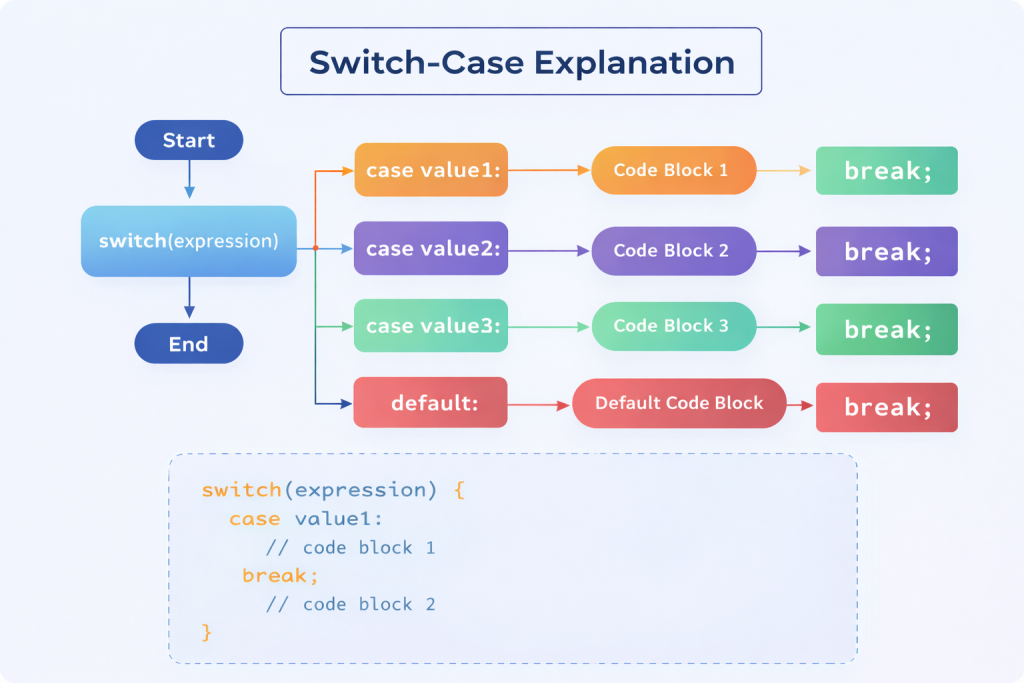
🔹 Definition
The switch statement selects one execution path based on the value of a variable or expression.
- The value is compared against multiple
caselabels - When a match is found, that block executes
- Control usually exits the
switchusingbreak
🔹 Syntax
switch (expression) {
    case value1:
        // statements
        break;

    case value2:
        // statements
        break;

    default:
        // statements
}
Key Rules
expressionis evaluated once- Each
casemust be a constant value defaultexecutes if no case matchesbreakis optional but critical
🔹 Basic Example
int day = 3;

switch (day) {
    case 1:
        System.out.println("Monday");
        break;
    case 2:
        System.out.println("Tuesday");
        break;
    case 3:
        System.out.println("Wednesday");
        break;
    default:
        System.out.println("Invalid day");
}
Execution Flow
dayis evaluated → value is3- Java checks cases top to bottom
case 3matches"Wednesday"is printedbreakexits the switch
Only one case executes.
🔹 Role of break (VERY IMPORTANT)
What break Does
- Immediately exits the
switchblock - Transfers control to the next statement after
switch
Without break, Java continues executing the next cases — this is called fall-through.
🔹 Example Without break
int x = 1;

switch (x) {
    case 1:
        System.out.println("One");
    case 2:
        System.out.println("Two");
}
Output
One
Two
Why This Happens
case 1matches- No
break, so execution continues case 2runs even though it didn’t match
⚠️ Reality Check About Fall-Through
- Sometimes used intentionally (grouping cases)
- Most of the time it is a bug
- One missing
breakcan break logic silently
That’s why many developers:
- Always add
break - Or use modern switch expressions (Java 14+)
🔹 Intentional Fall-Through Example
int day = 6;

switch (day) {
    case 6:
    case 7:
        System.out.println("Weekend");
        break;
    default:
        System.out.println("Weekday");
}
Here, fall-through is deliberate and correct.
🔹 Data Types Supported by switch
✅ Supported
byteshortintcharStringenum
❌ Not Supported
floatdoubleboolean
Why These Are Not Allowed
- Floating-point precision issues
- Boolean has only two values →
if-elseis clearer
🔹 switch with String
String option = "login";

switch (option) {
    case "login":
        System.out.println("Logging in");
        break;
    case "logout":
        System.out.println("Logging out");
        break;
    default:
        System.out.println("Invalid option");
}
This is very common in:
- Menu systems
- Command handling
- User input processing
🔹 if-else vs switch (Deep Comparison)
| Aspect | if-else | switch |
|---|---|---|
| Condition Type | Boolean expressions | Discrete values |
| Range checks | Yes | No |
| Readability | Decreases as cases grow | Clear for many cases |
| Performance | Linear checks | Optimized internally |
| Flexibility | Very high | Limited |
| Best Use | Complex logic | Fixed-value selection |
🔹 Performance Insight (Honest)
if-elsechecks conditions one by oneswitchcan use:- Jump tables
- Hashing (for Strings)
- This makes
switchfaster and more predictable for many cases
But:
- Performance difference matters only at scale
- Readability should be the first priority
🔹 When NOT to Use switch
Avoid switch when:
- Conditions involve ranges (
>,<) - Logic depends on multiple variables
- Expressions are complex
Example better with if-else:
if (marks >= 90) { }
🔚 Final Verdict
switchis not a replacement forif-else- It is a specialized tool for fixed-value decisions
- Cleaner, faster, safer when used correctly
- Dangerous if
breakis forgotten
Good developers choose:
if-elsefor logicswitchfor selection
Choosing the Right Conditional Statement
- Use
iffor single checks - Use
if-elsefor binary decisions - Use
else-iffor range-based logic - Use
switchfor fixed-value comparisons
Correct selection improves:
- Code clarity
- Maintainability
- Performance
Common Errors
- Using assignment (
=) instead of comparison (==) - Missing
breakin switch cases - Poor condition ordering
- Excessive nesting
- Unreachable code blocks
Such errors often compile successfully but cause incorrect behavior.
Conditional Statements in Large Applications
In large codebases:
- Conditions drive workflows
- Validation logic depends on accuracy
- Business rules are expressed through conditions
- Readability becomes critical for maintenance
Poorly structured conditions increase technical debt.
Conclusion
Conditional statements enable Java programs to make decisions and control execution flow based on dynamic conditions. The if, if-else, and switch constructs provide structured approaches to decision-making, each suited to specific scenarios. Mastery of these statements is essential for implementing reliable logic, maintaining clean code, and building scalable Java applications.