Java Comments and Documentation
Java Comments & Documentation
In Java, comments and documentation are not optional extras. They are a core part of writing professional, readable, and maintainable code. Java applications are often worked on by multiple developers over many years, and without proper comments and documentation, even correct code becomes difficult to understand, debug, and enhance.
This topic explains Java comments and documentation in full depth, covering all types of comments, why they exist, how they should be written, real-life examples, best practices, and JavaDoc documentation.
What Are Comments in Java
Comments are pieces of text written inside the source code that are ignored by the Java compiler. They exist purely to help humans understand the code, not to affect program execution.
Java uses comments to:
- Explain complex logic
- Describe purpose of code
- Improve readability
- Help future developers
- Add documentation inside source files
Why Comments Are Important in Java
In real projects:
- Code is read more times than it is written
- Developers change teams
- Bugs are fixed months or years later
- Features are extended over time
Comments act like explanations written for humans, ensuring that code logic remains understandable long after it is written.
Types of Comments in Java
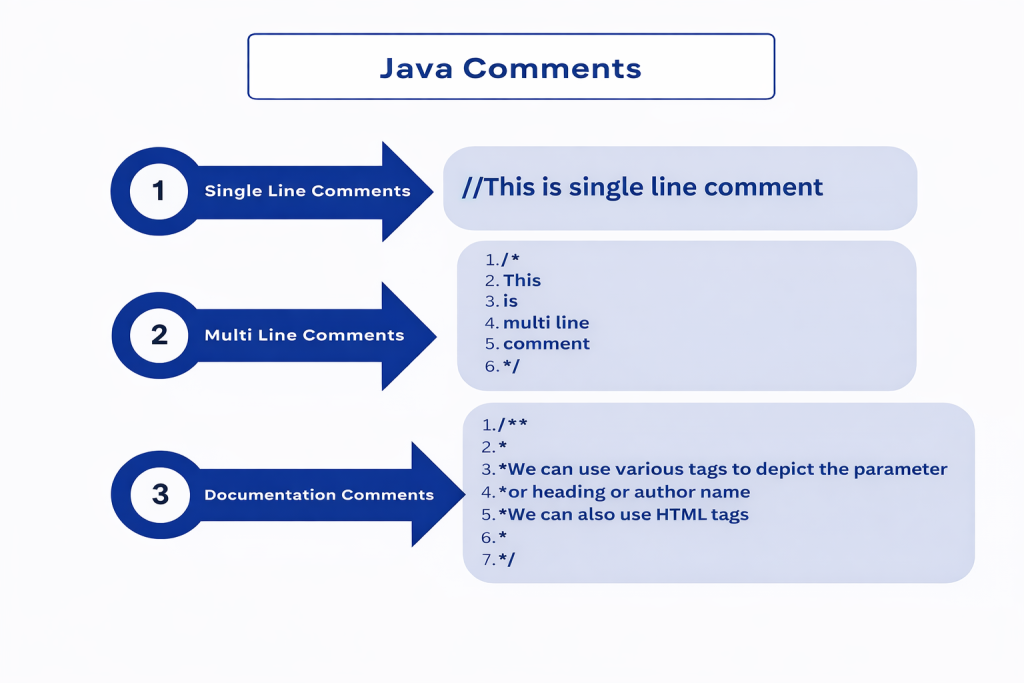
Java supports three types of comments:
- Single-Line Comments
- Multi-Line Comments
- Documentation Comments (JavaDoc)
Each type serves a different purpose.
1️⃣ Single-Line Comments
What Is a Single-Line Comment
A single-line comment starts with // and continues until the end of the line.
// This is a single-line comment
int age = 25; // storing user's age
When to Use Single-Line Comments
- Explain a single statement
- Clarify logic quickly
- Add short notes
- Comment out a single line temporarily
Example
👉 Traffic Sign Note
A single-line comment is like a short roadside sign:
“Speed Limit 40”
It gives quick context without detailed explanation.
Good Usage Example
// Check if user is eligible to vote
if (age >= 18) {
    System.out.println("Eligible");
}
Bad Usage Example
int a = 10; // assigning 10 to a
This is unnecessary because the code is already self-explanatory.
2️⃣ Multi-Line Comments
What Is a Multi-Line Comment
Multi-line comments start with /* and end with */.
/*
This method calculates
the total marks of a student
*/
When to Use Multi-Line Comments
- Explain complex logic
- Describe algorithms
- Add large explanations
- Temporarily disable multiple lines of code
Example in Code
/*
The following loop calculates
the sum of all elements
in the array
*/
for (int i = 0; i < arr.length; i++) {
    sum += arr[i];
}
Example
👉 Instruction Manual Page
Multi-line comments are like a manual page explaining how something works in detail.
Warning (Important)
Avoid using multi-line comments inside active code blocks unnecessarily. They can reduce readability if overused.
3️⃣ Documentation Comments (JavaDoc)
What Is JavaDoc
JavaDoc comments are special comments used to generate official documentation for Java classes, methods, and variables.
They start with /** and end with */.
/**
 * This class represents a Student
 */
class Student {
}
JavaDoc comments are processed by the JavaDoc tool to create HTML documentation.
Why JavaDoc Is Important
JavaDoc:
- Creates professional API documentation
- Is used in real enterprise projects
- Helps teams understand code contracts
- Is used by IDEs for tooltips
- Is expected in interviews and jobs
Structure of JavaDoc Comment
/**
 * Description of the class or method
 *
 * @tag explanation
 */
Common JavaDoc Tags
@param
Describes method parameters
/**
 * @param age age of the user
 */
@return
Describes return value
/**
 * @return total marks
 */
@throws
Describes exceptions
/**
 * @throws IOException if input fails
 */
@author
Specifies author
/**
 * @author Nitin
 */
@version
Specifies version
/**
 * @version 1.0
 */

JavaDoc Example (Complete)
/**
 * This method calculates the average marks
 *
 * @param total total marks
 * @param subjects number of subjects
 * @return average marks
 */
public double calculateAverage(int total, int subjects) {
    return total / subjects;
}
This documentation:
- Explains purpose
- Describes inputs
- Describes output
Generating JavaDoc Documentation
Java provides a built-in tool:
javadoc ClassName.java
This generates HTML documentation automatically.
Comments vs JavaDoc (Clear Difference)
| Feature | Comments | JavaDoc |
|---|---|---|
| Purpose | Explain code | Generate documentation |
| Used by Compiler | Ignored | Ignored |
| Output | None | HTML documentation |
| Usage | Developers | Developers + users |
Best Practices for Writing Comments
- Explain why, not what
- Keep comments up-to-date
- Avoid obvious comments
- Use JavaDoc for public APIs
- Write clear and meaningful descriptions
Common Mistakes with Comments
- Over-commenting simple code
- Writing misleading comments
- Leaving outdated comments
- Commenting bad code instead of fixing it
- Using comments instead of proper variable names
Good code should be self-explanatory, comments should add context, not noise.
Real-World Importance of Documentation
In real projects:
- Teams rely on JavaDoc
- APIs are documented using JavaDoc
- IDEs show JavaDoc on hover
- Poor documentation slows development
Well-documented code reduces onboarding time and prevents misuse.
Comments and Code Readability
Readable code uses:
- Meaningful variable names
- Clean structure
- Minimal but meaningful comments
- Proper documentation
Comments support readability, but cannot replace good code design.
Conclusion
Java comments and documentation are essential tools for writing professional software. Single-line and multi-line comments help explain logic, while JavaDoc creates structured, reusable documentation for classes and methods. Proper use of comments improves readability, maintainability, and collaboration. Mastering comments and JavaDoc is a key step toward writing clean, enterprise-ready Java code.