Java Data Types Explained in Detail
Java Data Types
In Java, data types decide how data is stored, how much memory is used, and what operations are allowed on that data. Java is a strongly typed language, which means every variable must have a clearly defined data type before it is used. This rule is non-negotiable in Java and is one of the biggest reasons Java programs are reliable, predictable, and safe.
A weak understanding of data types leads to:
- Compilation errors
- Runtime bugs
- Memory issues
- Incorrect calculations
So this topic must be understood deeply, not superficially.
What Is a Data Type in Java
A data type tells Java three things:
- What kind of value a variable can store
- How much memory should be allocated
- What operations are valid on that value
Example:
int marks = 90;
Here:
int→ data typemarks→ variable90→ value
Java now knows:
markswill store only integer values- It needs 4 bytes of memory
- Decimal or text values are not allowed
Why Java Uses Strict Data Types
Java enforces strict data typing to:
- Catch errors at compile time
- Prevent accidental data loss
- Improve performance
- Make large applications maintainable
- Ensure consistent behavior across platforms
Languages with loose typing may look flexible, but they often fail silently. Java chooses safety over shortcuts.
Classification of Data Types in Java
Java data types are divided into two major categories:
- Primitive Data Types
- Non-Primitive (Reference) Data Types
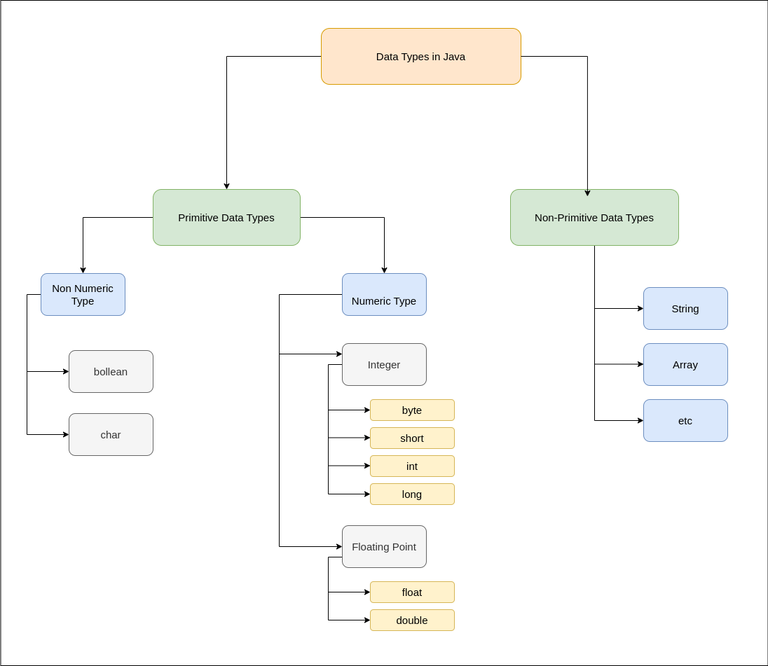
Primitive Data Types
Primitive data types store actual values directly in memory.
They are fast, memory-efficient, and fixed in size.
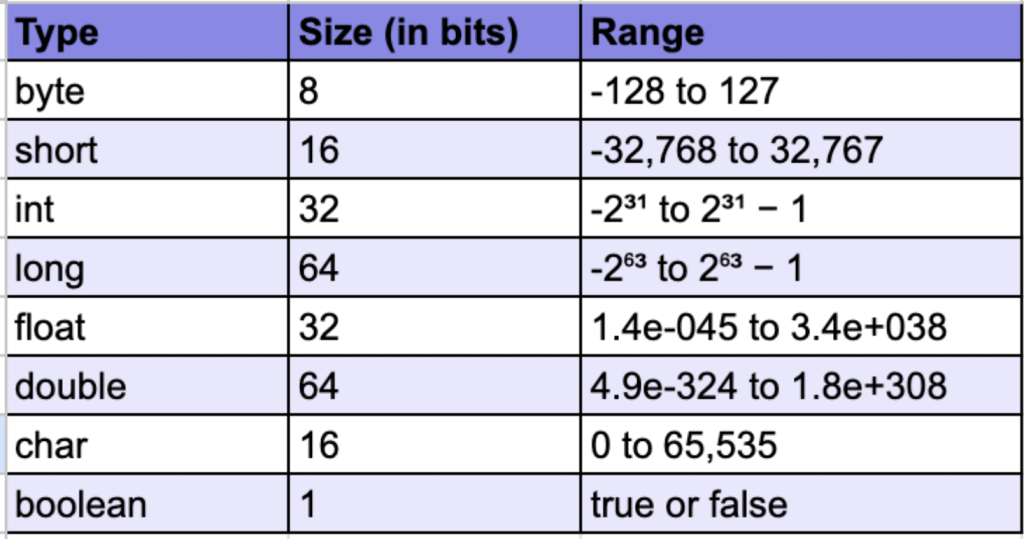
Java has 8 primitive data types.
1. byte
- Size: 1 byte (8 bits)
- Range: -128 to 127
- Used when memory saving is critical
byte age = 25;
Used mostly in:
- Large arrays
- File handling
- Network streams
2. short
- Size: 2 bytes
- Range: -32,768 to 32,767
short year = 2024;
Less commonly used than int.
3. int
- Size: 4 bytes
- Most commonly used integer type
- Default choice for whole numbers
int salary = 50000;
Why int is preferred:
- Balanced memory usage
- Fast processing
- Wide enough range for most cases
4. long
- Size: 8 bytes
- Used for very large values
- Must end with
L
long population = 9000000000L;
Used in:
- Banking systems
- Timestamps
- Large counters
5. float
- Size: 4 bytes
- Decimal values with limited precision
- Must end with
f
float interestRate = 7.5f;
Used when:
- Memory is critical
- High precision is not required
6. double
- Size: 8 bytes
- Default type for decimal values
- Higher precision than float
double price = 9999.99;
Most decimal calculations use double.
7. char
- Size: 2 bytes
- Stores a single Unicode character
char grade = 'A';
Why 2 bytes?
- Supports international characters
8. boolean
- Stores only
trueorfalse - Used in conditions and logic
boolean isLoggedIn = true;
Critical for:
- if-else
- loops
- decision-making
Non-Primitive (Reference) Data Types
Non-primitive data types do not store actual values directly.
They store references (memory addresses) to objects stored in heap memory.
String Data Type
String is the most used non-primitive type.
String name = "PrepCampusPlus";
Key points:
- Stores sequence of characters
- Immutable (cannot be changed)
- Stored in heap (string pool)
Array Data Type
Arrays store multiple values of the same type.
int[] marks = {80, 85, 90};
Characteristics:
- Fixed size
- Indexed
- Stored in heap
- Treated as objects
Class and Object Types
User-defined classes are also data types.
class Student {
    int age;
    String name;
}
Objects of this class store data in heap memory.
Default Values of Data Types
Default values apply only to instance and static variables.
| Data Type | Default Value |
|---|---|
| int | 0 |
| double | 0.0 |
| boolean | false |
| char | ‘\u0000’ |
| Reference | null |
Local variables do not get default values.
Type Casting in Java
Type casting means converting one data type into another.
Widening (Implicit Casting)
Smaller → larger
Done automatically.
int x = 10;
double y = x;
No data loss.
Narrowing (Explicit Casting)
Larger → smaller
Must be done manually.
double d = 12.8;
int i = (int) d;
Decimal part is lost.
Data Type Compatibility Rules
- Same types → direct assignment
- Smaller to larger → allowed
- Larger to smaller → casting required
- boolean cannot mix with numbers
Java enforces these rules strictly.
Common Beginner Mistakes
- Using
floatwithoutf - Expecting default values for local variables
- Using wrong data type size
- Ignoring casting rules
- Confusing
charandString
Why Data Types Matter in Real Projects
In real applications:
- Correct data types improve performance
- Memory usage becomes predictable
- Bugs reduce significantly
- Code becomes readable and professional
Bad data type decisions cause long-term maintenance issues.
Conclusion
Java data types define how data is represented, stored, and processed in a Java program. Primitive data types handle simple values efficiently, while non-primitive data types manage complex data using references. Java’s strict type system ensures safety, performance, and reliability. A strong understanding of data types is essential for writing correct, efficient, and professional Java applications.