First Java Program: Hello World with Complete Explanation
First Java Program (Hello World)
Writing your first Java program is the starting point of your Java learning journey. The Hello World program is intentionally simple, but it plays a very important role. It helps you understand how Java programs are structured, how the compiler works, how the JVM executes code, and how output is produced.
This post explains the Hello World program in complete detail, without skipping even small concepts, so that beginners can clearly understand what is happening behind the scenes.
What Is the Hello World Program?
The Hello World program is the simplest executable Java program. Its main purpose is not functionality but verification.
By running this program, you confirm that:
- Java is installed correctly
- Environment variables are set properly
- The Java compiler is working
- The JVM can execute Java programs
If Hello World runs successfully, your system is ready for Java development.
Why Java Programs Follow a Fixed Structure
Java is a strictly structured language. Unlike some scripting languages, Java does not allow free-form code. Every instruction must exist inside a class and inside a method.
This strict structure helps Java:
- Maintain consistency
- Avoid unpredictable behavior
- Scale well for large applications
- Reduce runtime errors
The Hello World program introduces this structure clearly.
Writing the First Java Program
Create a new file named HelloWorld.java and write the following code:
class HelloWorld {
    public static void main(String[] args) {
        System.out.println("Hello World");
    }
}
Understanding the Class Declaration
class HelloWorld {
classis a keyword used to define a classHelloWorldis the class name- Java programs must be written inside a class
- The class name must exactly match the file name
Correct:
HelloWorld.java → class HelloWorld
Incorrect:
HelloWorld.java → class Test
Java is case-sensitive, so even a small mismatch will cause errors.
Understanding the Main Method
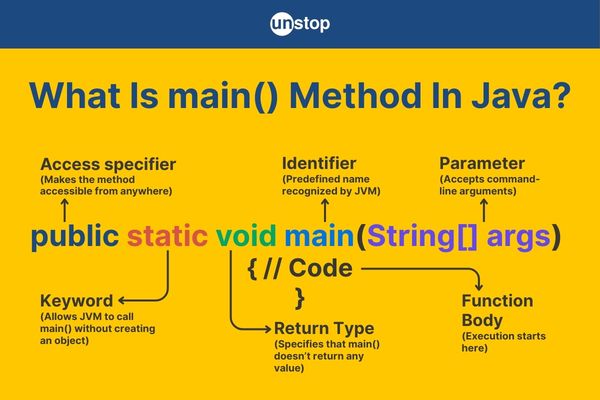
public static void main(String[] args)
This line is the most important line in a Java program.
The JVM always looks for this exact method to start execution.
Keyword-by-keyword explanation
public
Makes the method accessible to the JVM from anywherestatic
Allows the JVM to call the method without creating an objectvoid
Indicates the method does not return any valuemain
Fixed method name recognized by the JVMString[] args
Accepts command-line arguments
If this signature is changed even slightly, the program will not run.
Printing Output in Java
System.out.println("Hello World");
This statement prints text to the console.
Explanation:
Systemis a built-in Java classoutrepresents the standard output streamprintlnprints text and moves the cursor to the next line
Java uses methods instead of direct print statements, which improves consistency and control.
Saving the Java File Correctly
The file must be saved with the .java extension.
Correct:
HelloWorld.java
Incorrect:
HelloWorld
HelloWorld.txt
Java compiler only recognizes files with .java extension.
Compiling the Java Program
Open the terminal or command prompt in the folder where the file is saved.
javac HelloWorld.java
What happens during compilation:
- Java compiler checks syntax
- Converts source code into bytecode
- Creates
HelloWorld.class
The .class file contains platform-independent bytecode.
Running the Java Program
java HelloWorld
Output:
Hello World
Important rules:
- Do not include
.class - Java command launches the JVM
- JVM loads the class and executes
main
How Java Executes Hello World Internally
- Source code is compiled into bytecode
- JVM loads the class file
- Bytecode is verified for safety
- JVM converts bytecode to machine code
- Program starts executing from
main - Output is printed
This process ensures platform independence and security.
Common Beginner Errors and Reasons
Class name mismatch
Causes compilation failure
Missing main method
JVM cannot find entry point
Incorrect case usage
Java is case-sensitive
PATH not configured
javac or java not recognized
Understanding these mistakes early saves time later.
Why Hello World Is More Important Than It Looks
Hello World teaches:
- Java syntax rules
- Program structure
- Compilation process
- Execution flow
- JVM interaction
Every advanced Java concept builds on this foundation.
Conclusion
The Hello World program is the foundation of Java programming. It introduces the structure of Java programs, explains how execution begins, and demonstrates how Java code is compiled and run. Understanding each line of this program builds confidence and prepares beginners for writing more complex Java applications.